
Design and Development of a Visitor and Security Permit Management System
Client
Black Wolf Eyes - BWE
Duration
3 Months
Category
Systems & Software Development
Date
2026
Project Summary :
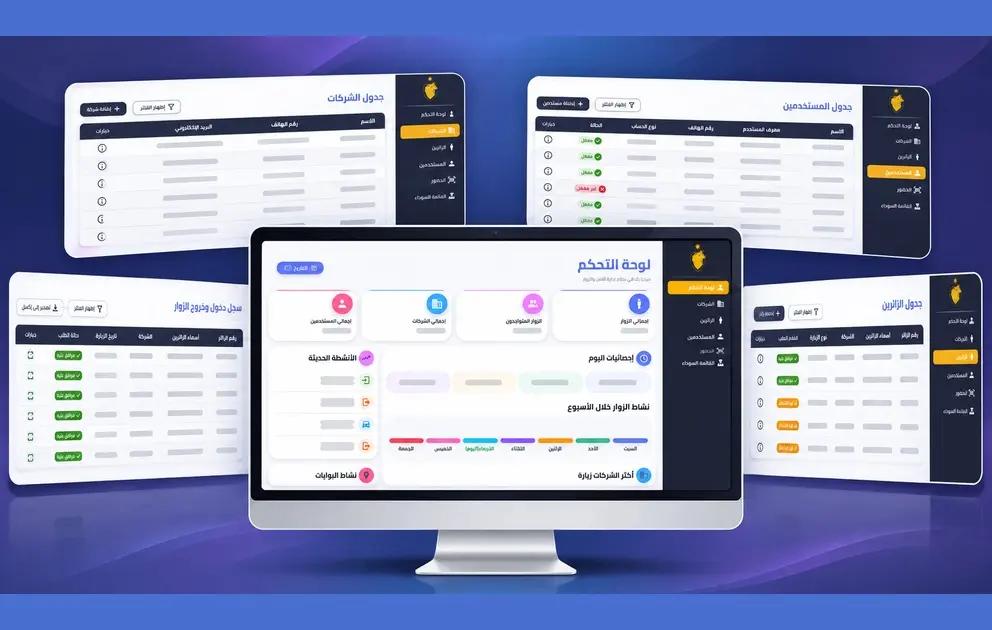
Design and development of a centralized and integrated electronic system for managing visitors and security permits, aimed at automating and streamlining visitor reception procedures, visit requests, permit issuance, and monitoring entry and exit movements within the facility or organization.
Project Scope :
1) Requirements Analysis and System Design 1.1. Reviewing and analyzing existing visitor reception procedures. 1.2. Identifying approved security policies and procedures for entry and exit. 1.3. Analyzing the requirements of administrative departments and security units. 1.4. Preparing the Functional and Technical Requirements Specification (FRS). 1.5. Designing the system architecture and database structure. 1.6. Designing the user interfaces and user experience (UI/UX). 1.7. Defining user roles, access permissions, and approval workflows. 2) Visitor Information Management 2.1. Creating and managing visitor profiles. 2.2. Recording personal information and contact details. 2.3. Recording identification details and official documents. 2.4. Recording information about the organization to which each visitor belongs. 2.5. Maintaining a historical record of each visitor's previous visits. 2.6. Providing search and inquiry capabilities based on multiple criteria. 2.7. Classifying visitors according to visit type, affiliated organization, and purpose of visit. 2.8. Managing lists of prohibited or restricted visitors in accordance with authorized permissions and approved policies. 3) Visit Request Management 3.1. Enabling employees and authorized entities to submit visit requests electronically. 3.2. Defining visit details, including: • Visitor's name and personal information. • The organization or individual to be visited. • Purpose of the visit. • Visit date and time. • Location or building to be accessed. • Expected visit duration. • Number of visitors and accompanying persons. 3.3. Attaching the required supporting documents. 3.4. Modifying or cancelling requests according to assigned permissions. 3.5. Tracking request statuses (New, Under Review, Approved, Rejected, and Cancelled). 3.6. Managing individual and group visit requests. 4)Security and Administrative Approvals Management 4.1. Designing multi-level electronic approval workflows. 4.2. Forwarding visit requests to the relevant departments for review. 4.3. Supporting approvals from the host department and security administration. 4.4. Supporting additional approvals based on site sensitivity or the nature of the visit. 4.5. Recording approval and rejection decisions, including their respective reasons. 4.6. Defining approval authorities according to the organizational structure. 4.7. Sending automated notifications whenever a request moves between approval stages. 4.8. Maintaining a historical record of all approval actions. 5) Security Permit Management 5.1. Issuing electronic access permits upon completion of the required approvals. 5.2. Creating temporary, recurring, or multiple-entry permits. 5.3. Defining the start and expiration dates and times of each permit. 5.4. Specifying authorized access locations and restricted areas. 5.5. Defining permit types and access privilege levels. 5.6. Issuing permits for visitors, contractors, suppliers, and official delegations. 5.7. Generating a unique QR code or barcode for each permit. 5.8. Enabling permit suspension, cancellation, or validity extension. 5.9. Electronically verifying permit authenticity and status. 6) Entry and Exit Management (Check-in / Check-out) 6.1. Recording visitor arrivals at reception desks or security gates. 6.2. Verifying visitor identities and issued permits. 6.3. Scanning QR codes to verify permit validity. 6.4. Recording actual entry dates and times. 6.5. Recording departure dates and times. 6.6. Identifying the entry and exit gates or checkpoints. 6.7. Recording denied or unauthorized entry attempts. 6.8. Monitoring visitors currently inside the facility in real time. 6.9. Generating alerts when visitors exceed their permitted visit duration or when their permits expire. 7) Employee and Host Department Management 7.1. Creating and managing profiles of employees authorized to host visitors. 7.2. Linking employees to their respective departments and divisions. 7.3. Defining permissions for submitting visit requests and hosting visitors. 7.4. Managing the organization's affiliated entities, locations, and buildings. 7.5. Linking visit requests to the relevant host employee or department. 7.6. Notifying host employees when their visitors arrive. 7.7. Enabling host employees to monitor visit statuses. 8) Notifications and Alerts 8.1. Notifications for newly submitted visit requests. 8.2. Approval and rejection notifications. 8.3. Visitor arrival notifications to host employees. 8.4. Permit expiration alerts. 8.5. Alerts regarding delayed visitor departures. 8.6. Notifications of unauthorized access attempts. 8.7. Supporting email, SMS, and other available notification channels. 9) Dashboards and Reports 9.1. Providing a main dashboard displaying visitor activity and movement. 9.2. Generating daily, weekly, and monthly visitor statistics. 9.3. Generating visit reports by departments and divisions. 9.4. Generating reports on issued, active, and expired permits. 9.5. Generating entry and exit reports by security gate. 9.6. Generating reports on rejected and cancelled visits. 9.7. Generating reports on visitors currently inside the facility. 9.8. Generating reports on companies, contractors, and suppliers. 9.9. Generating reports on unauthorized access attempts. 9.10. Enabling report exports in Excel and PDF formats. 10) User and Access Permissions Management 10.1. Creating and managing user accounts. 10.2. Defining roles and access permissions according to the organizational structure. 10.3. Supporting the following key user roles: • System Administrator. • Security Administration. • Reception Officer. • Security Gate Officer. • Host Employee. • Administrative Management. • Reporting and Audit Officer. 10.4. Applying access permissions based on job responsibilities and authorized locations. 10.5. Recording all system operations and modifications through an Audit Trail. 11) Technical and Security Requirements 11.1. Developing the system using a modern and scalable technical architecture. 11.2. Providing a centralized and secure database. 11.3. Implementing authentication and user identity verification mechanisms. 11.4. Supporting Role-Based Access Control (RBAC). 11.5. Encrypting sensitive data and personal information. 11.6. Maintaining a comprehensive audit log of all system operations. 11.7. Implementing data backup and recovery policies. 11.8. Supporting multiple languages, including Arabic and English. 11.9. Supporting access through desktop computers, tablets, and smartphones. 11.10. Providing Application Programming Interfaces (APIs) for integration with external systems. 12) Integration with Security and Technical Systems 12.1. Integration with Access Control Systems. 12.2. Integration with card readers and QR code scanning devices. 12.3. Integration with identity management systems and data verification platforms, where integration interfaces are available. 12.4. Integration with Human Resources (HR) systems to verify employee information. 12.5. Integration with CCTV surveillance systems, subject to technical feasibility. 12.6. Integration with electronic gate systems and security barriers. 12.7. Integration with notification systems, email services, and SMS platforms. 13) Testing, Deployment, and Training 13.1. Conducting functional and technical system testing. 13.2. Testing access permissions and approval workflows. 13.3. Testing permit verification and entry/exit procedures. 13.4. Conducting performance and security testing. 13.5. Performing User Acceptance Testing (UAT). 13.6. Resolving identified issues and errors. 13.7. Configuring the production environment and deploying the system. 13.8. Training security administration staff, reception personnel, and system users. 13.9. Delivering technical documentation and user manuals. 13.10. Providing technical support throughout the agreed warranty period.