

Design and Development of the Noor Iraq Platform and Application
Client
Ministry of Electricity – Baghdad Electricity Distribution Directorate
Duration
3 months
Category
Systems & Software Development
Date
2026
Project Summary :
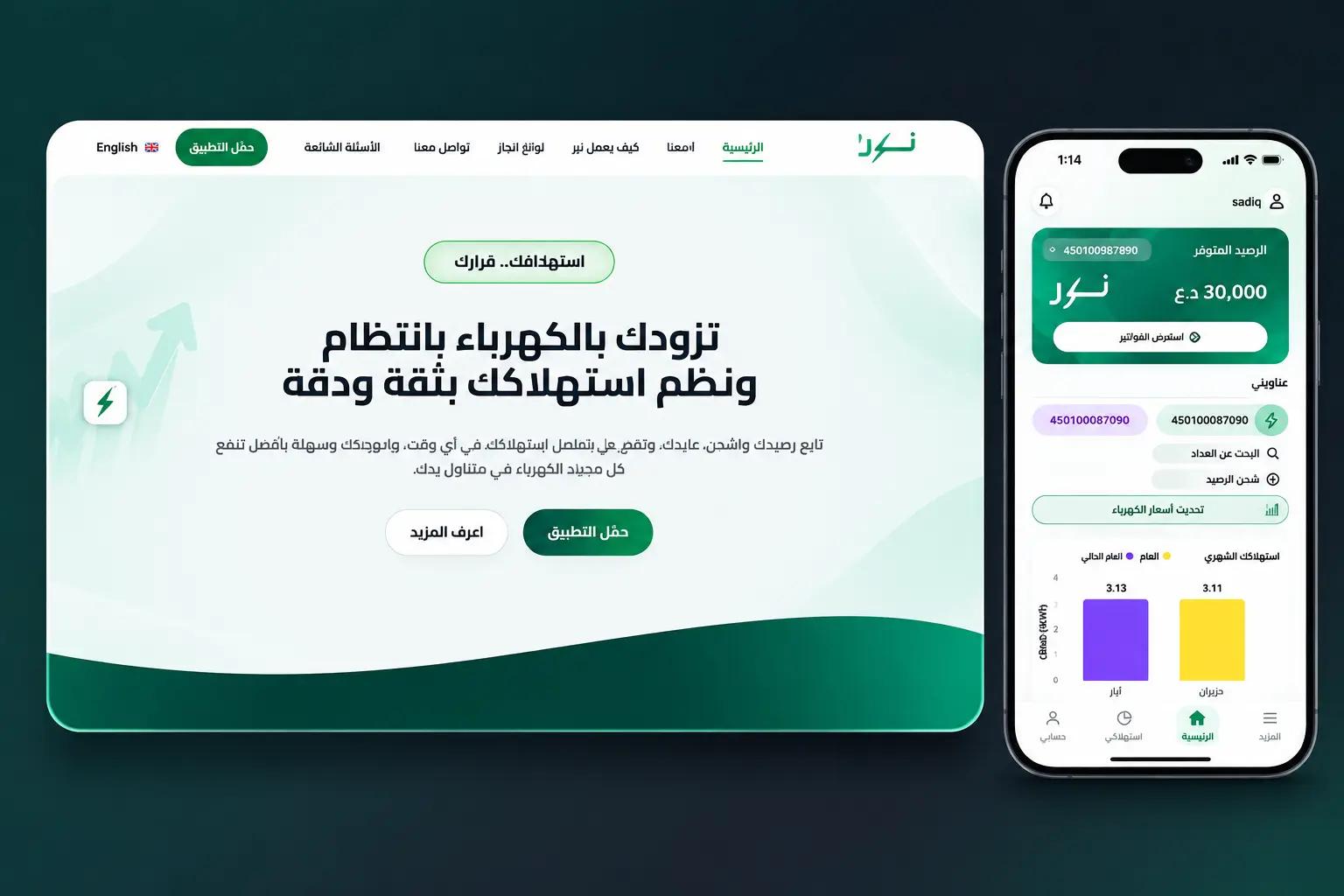
Design and development of a digital platform and mobile application named "Noor" (NOOR), serving as the dedicated digital interface for consumers under the Smart Prepaid Metering System Project. The platform enables citizens to manage their electricity subscriptions, monitor energy consumption, and recharge their balances electronically with ease, transparency, and security.
Project Scope :
1) Secure Authentication and Consumer Account Management (Authentication & Account Management) 1.1. Authentication and Identity Verification • Mobile phone number-based login. • User identity verification through a six-digit One-Time Password (OTP). • Provision of a countdown timer for OTP resending. • Implementation of security mechanisms to prevent unauthorized login attempts. • User session management and secure logout. 1.2. Profile Management • Creation and management of consumer accounts. • Viewing and updating personal information where permitted. • Changing mobile phone numbers through a dual-verification process involving both the old and new numbers. • Management of devices and sessions associated with the account. • Provision of a feature to log out from all devices. • Provision of an account deletion request mechanism in accordance with approved policies. 2) Smart Meter Management (Smart Meter Management) 2.1. Linking one or multiple electricity meters to a consumer account. 2.2. Verifying meter ownership or the user's authorization to manage the meter. 2.3. Displaying individual data for each meter. 2.4. Allowing consumers to assign custom names or aliases to meters for easier identification. 2.5. Displaying the available monetary balance for each meter. 2.6. Displaying the date and time of the most recent recharge transaction. 2.7. Displaying the meter connectivity status (Online / Offline). 2.8. Displaying meter information, identification number, and subscription details. 2.9. Monitoring meter status and associated alerts. 2.10. Managing meters linked to the account in accordance with approved access permissions. 3) Energy Consumption Monitoring and Analytics (Energy Consumption Monitoring & Analytics) 3.1. Consumption Monitoring and Analysis • Displaying electrical energy consumption for each meter in kilowatt-hours (kWh). • Providing interactive charts to visualize consumption rates. • Comparing current-day consumption with the previous day's consumption. • Displaying the monetary equivalent of consumed energy in Iraqi Dinars (IQD). • Calculating consumption costs based on the approved electricity tariff. • Displaying daily, monthly, and cumulative consumption indicators. 3.2. Time Period Management • Allowing users to select custom time periods to review consumption data. • Displaying consumption data by day, week, and month. • Comparing consumption across different time periods. • Displaying consumption trends and patterns. • Providing historical data to help consumers optimize and reduce energy consumption. 4) Balance Recharge and Electronic Payment Management (Recharge & E-Payment) 4.1. Balance Recharge Process • Developing a comprehensive electronic interface for recharging meter balances. • Verifying meter and subscriber information before completing a recharge transaction. • Displaying details of the meter selected for recharge. • Suggesting recharge amounts based on previous average consumption. • Allowing consumers to enter a custom recharge amount. • Displaying transaction details before payment confirmation. • Integration with approved electronic payment gateways. • Supporting payments through bank cards compatible with the selected payment gateway. • Displaying payment and recharge transaction statuses in real time. • Updating the meter balance after successful recharge confirmation from the central systems. 4.2. Financial Transaction History and Receipts • Maintaining an electronic record of all recharge and payment transactions. • Displaying financial transaction details and dates. • Categorizing transactions by transaction type and associated meter. • Providing search and filtering options based on time periods. • Displaying the status of each transaction: Successful, Pending, or Failed. • Generating an electronic receipt for every successful recharge transaction. • Allowing users to download receipts in PDF format. • Providing options to share receipts electronically. • Handling and tracking cases where payment has been deducted without the recharge being completed, in accordance with the approved financial reconciliation procedures. 5) Notifications and Alerts (Notifications & Alerts) 5.1. Sending notifications upon successful recharge transactions. 5.2. Notifying consumers when the meter balance falls below a specified threshold. 5.3. Sending alerts when the remaining balance is approaching depletion. 5.4. Sending notifications when meter connectivity is lost or restored. 5.5. Sending payment confirmation and financial transaction notifications. 5.6. Providing alerts related to meter status and services. 5.7. Providing settings to manage the types of notifications received by consumers. 6) Account Management and Customer Support (Account & Customer Support) 6.1. Account and Preference Management • Supporting both Arabic and English languages. • Providing a user-friendly interface compatible with different screen sizes. • Managing personal information and account settings. • Enabling password changes or verification methods where applicable. • Providing the option to log out from all devices. • Allowing account deletion requests in accordance with approved regulations. 6.2. Technical Support and Customer Services • Providing direct communication channels with the Consumer Service Center. • Integrating the application with the unified customer service number (7360). • Providing an email communication channel. • Developing a Frequently Asked Questions (FAQ) section. • Providing application usage guidelines and instructions for linking smart meters. • Offering guides on balance recharge procedures and electronic payment methods. • Enabling consumers to submit technical inquiries and complaints and track their status, subject to the approval of this functionality within the customer service system. 7) Administrative Portal and Centralized Management Dashboard (Admin Portal & Management Dashboard) 7.1. Developing a centralized dashboard for application management and monitoring. 7.2. Managing consumer accounts and their associated meters based on assigned permissions. 7.3. Monitoring registration processes and account activation. 7.4. Monitoring recharge and electronic payment transactions. 7.5. Monitoring financial operations and transaction statuses. 7.6. Managing FAQ content and user guidelines. 7.7. Managing notifications and alerts. 7.8. Managing application content and awareness messages. 7.9. Providing reports and statistics on application usage. 7.10. Managing administrative users and access permissions. 7.11. Recording administrative activities and changes (Audit Trail). 8) Integration with Central Systems (System Integration) 8.1. Integration with the Head-End System (HES) to retrieve meter data, connectivity statuses, and consumption information, subject to the availability of supported interfaces. 8.2. Integration with approved billing and electricity tariff systems to calculate the monetary value of energy consumption. 8.3. Integration with the Prepaid Vending System to process balance recharge transactions. 8.4. Integration with electronic payment gateways to process financial transactions and verify their results. 8.5. Integration with the SMS gateway to deliver OTP verification codes and notifications. 8.6. Providing secure and structured Application Programming Interfaces (APIs) for data exchange with connected systems. 8.7. Implementing data integrity verification and financial transaction reconciliation mechanisms between the application and central systems. 9) Technical and Security Requirements (Technical & Security Requirements) 9.1. Developing applications compatible with Android and iOS operating systems. 9.2. Developing centralized Backend APIs. 9.3. Designing a secure and scalable database. 9.4. Implementing authentication and session management mechanisms. 9.5. Encrypting communications and sensitive data. 9.6. Implementing access permissions and data access controls. 9.7. Securing integration interfaces against unauthorized access. 9.8. Implementing activity logging and monitoring mechanisms (Logging & Monitoring). 9.9. Providing backup and data recovery mechanisms. 9.10. Ensuring application stability and its ability to handle large numbers of users and concurrent transactions. 9.11. Providing mechanisms for monitoring performance, availability, and system failure response. 10) Testing, Deployment, and Commissioning (Testing & Deployment) 10.1. Testing and Quality Assurance • Testing application functionalities and APIs. • Testing login and OTP verification processes. • Testing meter linking and consumption data retrieval. • Testing recharge and electronic payment transactions. • Testing financial transaction integrity and preventing duplicate recharge transactions. • Testing integration with HES, MDMS, and other connected systems. • Conducting performance, security, and load testing to assess the system's ability to handle user traffic. • Conducting User Acceptance Testing (UAT). 10.2. Deployment and Operations • Preparing the operational and hosting environment. • Publishing applications on Google Play and the Apple App Store. • Configuring and connecting central systems. • Launching the application for consumers. • Monitoring application performance and stability during the initial operational phase. 10.3. Training and Technical Support • Training administrative, operational, and technical support teams. • Delivering technical documentation and user manuals. • Providing technical support throughout the agreed warranty period. • Resolving errors and operational issues. • Providing updates and enhancements in accordance with the contractual agreement.